User Interface
The Talent Tracking UI has the following sections:
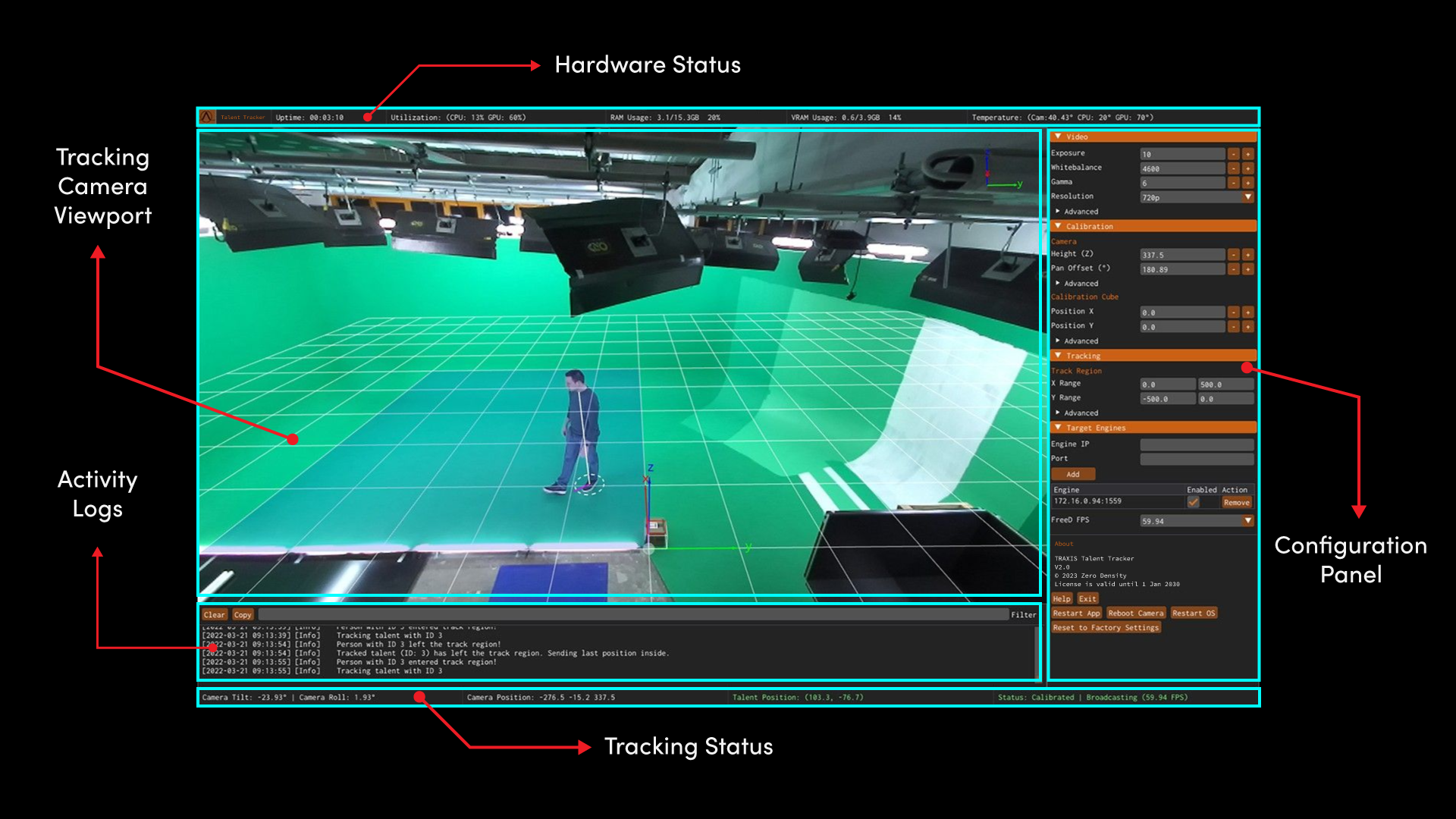
Hardware Status
The Hardware Status area contains the following information: Uptime, Time, Utilization (CPU / GPU), RAM Usage, VRAM Usage, and Temperature (Camera / CPU / GPU), which helps you to monitor your system condition. Saving the current configuration also occurs in the hardware status section via the Save Settings button.
Tracking Camera Viewport
Tracking Camera Viewport is the section where you can view talent tracking results in real-time. See Tracking Camera Viewport Indicators
Activity Logs
You can monitor, filter, copy, and trace your system activities via the Activity Logs screen.
Tracking Status
The Tracking Status area contains the following sections:
- Camera Tilt shows the tilt angle of the camera view in degrees.
- Camera Roll shows the roll angle of the camera view in degrees.
- Camera Position gives your camera position in X, Y, and Z axes towards the studio origin in centimeters. Z represents the height of the Talent Tracker Camera.
- Talent Position shows the talent position relative to studio origin in X and Y axes in cm.
- Status shows the current calibration and broadcasting status.
Configuration Panel
Configuration Panel has the following property groups:
- Video
- Calibration
- Tracking
- Multi-Talent
- Target Engines
- NDI Source
- About