Color Grading with 3D LUT Files
info
Before you start, ensure your CUBE files are in the project folder where you intend to use them.
Process
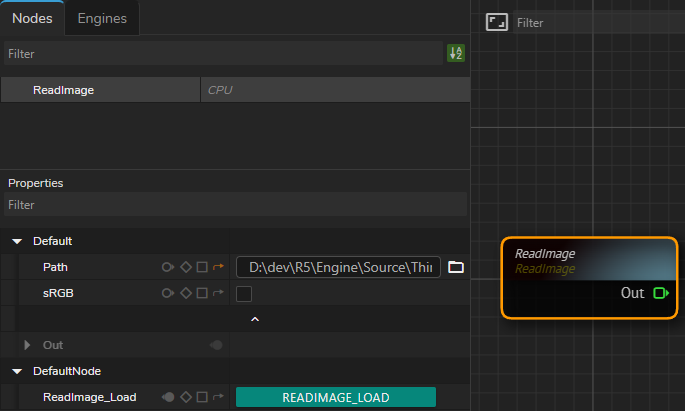
- Create a
ReadImagenode. - Go to
Pathproperty, click on the folder icon and navigate to the image file of your choice. - Click on the ReadImage_Load button.
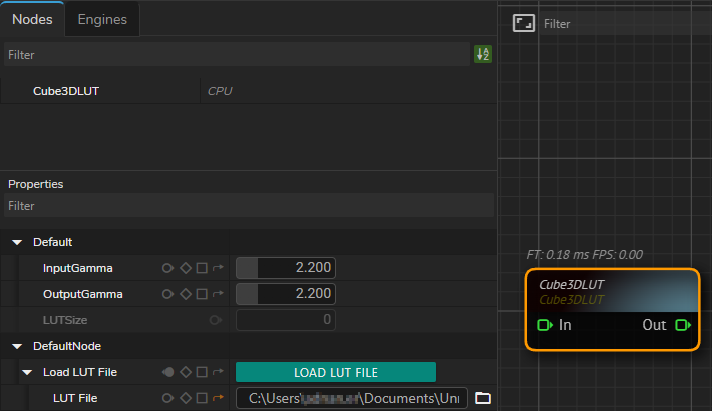
- Create
Cube3DLUTnode. - Expand the Load LUT File, click on the folder icon and navigate to the CUBE file of your choice.
- Click on the Load Lut File button.
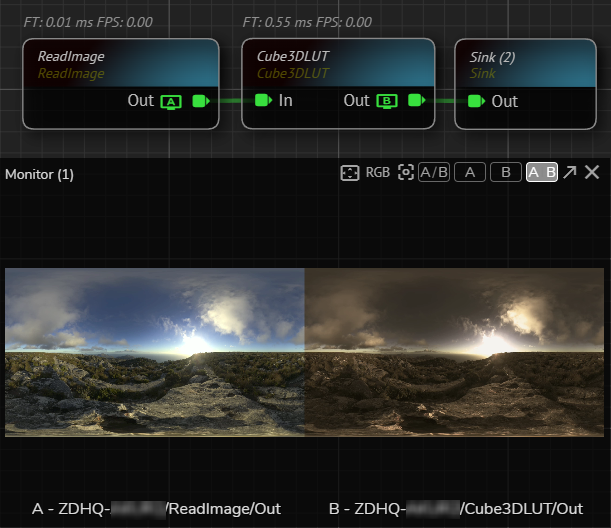
- Connect the
ReadImagenode'sOutpin to theIninput of theCube3DLUT. - Add Sink to the
Outoutput pin of theCube3DLUT. - Activate the APM A Channel on the
ReadImagenode'sOut. - Activate the APM B Channel on the
Cube3DLUTnode'sOut.
Now you can conduct further operations on your Lut file with the help of extensive node library such as Merge, Color Correct, etc.